Dataset
The dataset I chose to visualize this assignment was music, particularly an MPEG Audio Layer 3 (MP3). There was steep learning curve to an MP3s structure/theory, but the information contained in these files is incredible. I have a deep passion for music and learning how we digitally represent songs has always been an interest of mine. Oddly enough the pains of this project made me respect digital music and Spotify algorithms even more.
To explain how I modeled my data I will give a small overview of MP3s to my understanding. Encoding involves compression within the time and frequency dimension. The typical Sample Rate is 22050 per second, this means there is a sample of a sound frequency taken roughly every 22ms. The human ear cannot hear anything between 20ms. Once the frequency is taken it will translate that frequency into bits, how may bits someone chooses to represent that frequency is called a Bit Rate. The frequencies that are chosen to be recorded are only ones humans can hear, which call psychoacoustic analysis. Lastly, the Frame Rate is will be able to display the entirety of sounds within a section of time, combining both the Sample Rate and Bit Rates. There is also some metadata and other headers within the file that contain information about the recording itself, however for this project I mainly just used sample and Bit rate to decode the data.
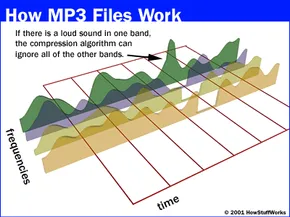
Sample Rate – the rate of capturing a sound and playing it back.
Bit Rate – the amount of bits used to describe each sound sample, the higher the bit rate the closer a frequency is to its original sound. The higher the bit rate the higher the quality but the larger the sound file is.
Frame Rate – Is a frame of Samples (typically 1152 per frame) used to decipher the spectrum of frequencies within a given amount of time.
For more information: https://en.wikipedia.org/wiki/MP3
Song used – Redbone Childish Gambino (00:05 – 00:10)
Design Process
To extract the data from the MP3 I used a popular python library called Librosa. Since it is able to unpack MP3 files and provide all the frequencies per sample, it makes the data easier to handle. This library is primarily used to model music for machine learning algorithms so there are a lot of statistical analysis tools I was able to use. I did not clean the data at all, but I did only take a small 5 second portion of it. Any more crashed GrassHopper, but within that 5 seconds is 110250 samples of frequencies interpreted as floats (0.88 MB). So, with this information I was able to provide different examples of how machines represent data.
First Print
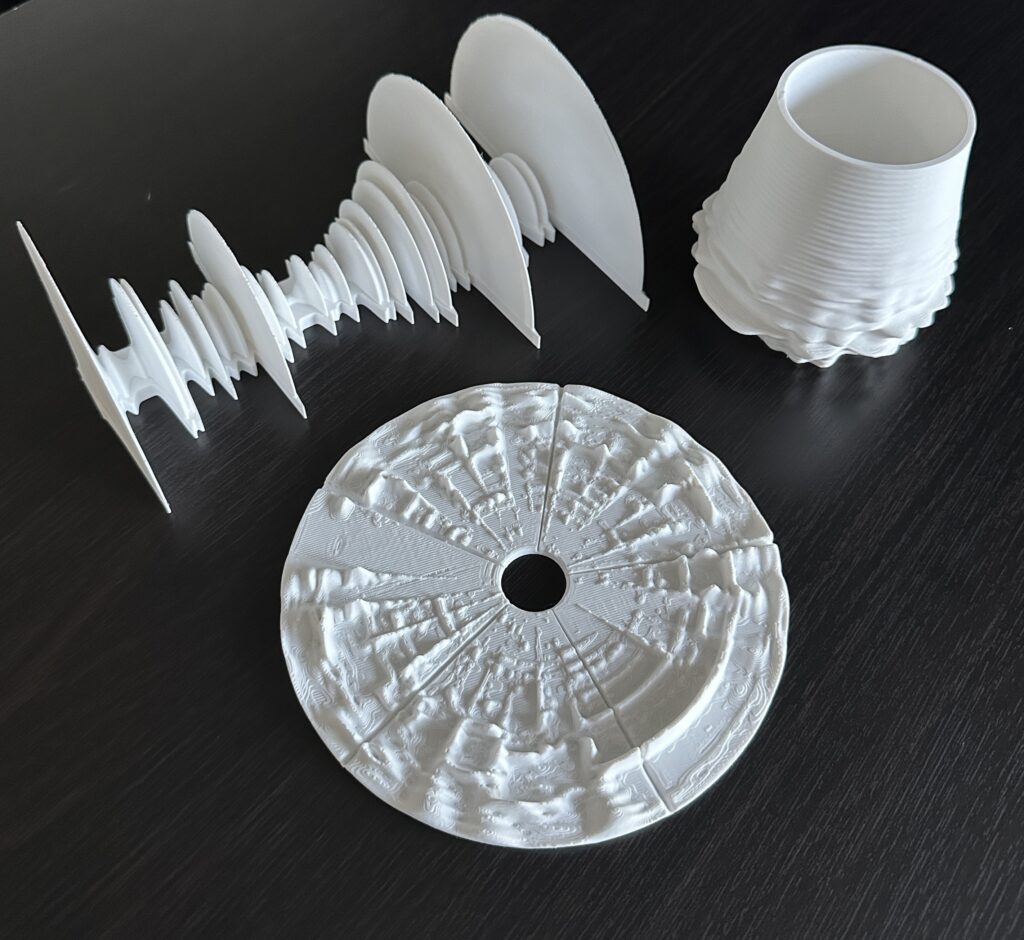
I just wanted to display the raw information contained within the 5 seconds of music. These raw frequencies would be streamed to speakers, a positive frequency is translated to positive pressure from the speaker. Negative frequency would be negative pressure, each creating a unique sound. So, I wanted to create a display of the frequency, so I removed all zero crossings of the frequency and just got their absolute value and plotted. Here is my result:


Second Print
After reviewing the print from above I started to realize someone couldn’t associate the print with the music itself. When we listen to music there are many layers of songs and tones at any moment. I wanted to display all frequencies within a frame and where they occur on a pitch scale and time scale. Typically we represent this in something called a spectrogram. When songs are being analyzed and displayed something called a Short-Term Fourier Transformation is used. Luckily, Librosa had a library that did just that. I had demagnified some of the data, adjusted the frequency range, then put it in a record shape. Here is my result:


Third Print
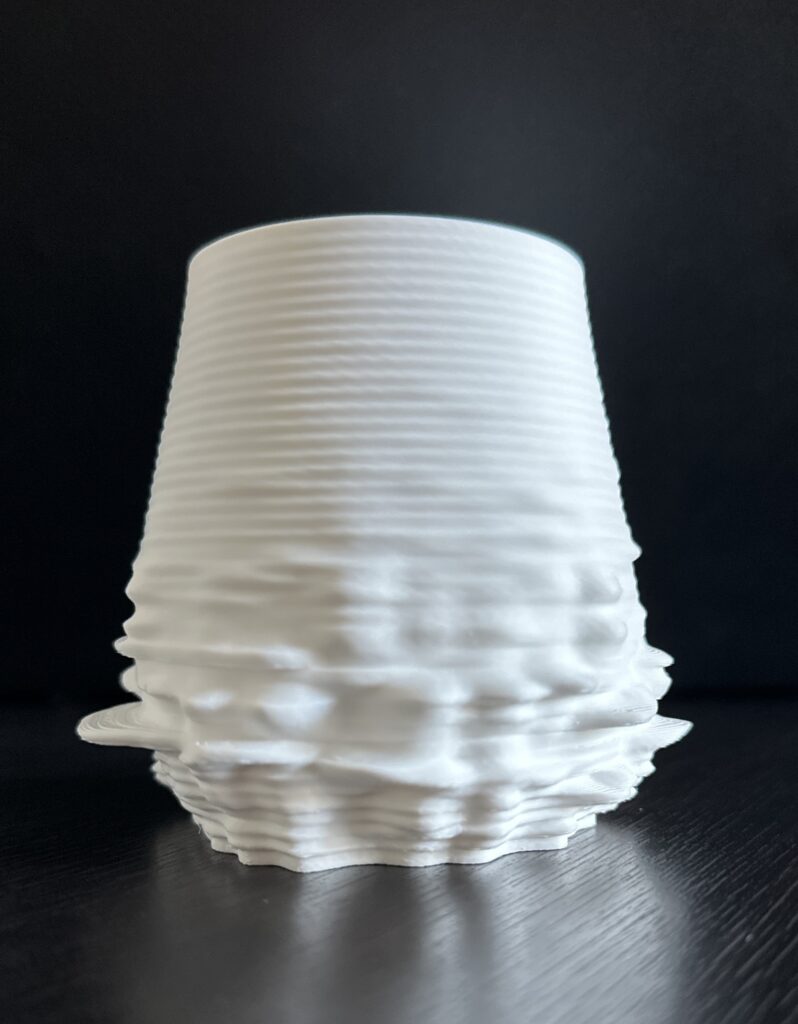
The plate above visually represented the sound okay, but I was still having a hard time visualizing the music. So I reviewed some different ways to represent the frequencies and found constant-Q or CQT. This is a transformation that can be performed on a frame that converts it from a time-domain signal to a time-frequency domain. The peaks in a CQT represent the precise tones and vibrations within a given frame. I mapped the CQT then placed it on a round vase. As you twist the vase you can see the song playing. Here is my result:

Here is the GrassHopper layout:

Reflection
This was a very interesting project that helped me understand digital recordings and some of the tools used to model them. There are a lot of great free machine learning libraries for sound, many of these libraries contain the tools I used to create these prints.
Going through each of the data points I realized just how many frequencies are contained within each file, some if it being noise and some being the actual instrumentation. These 3D models represent the noise or notes themselves and various ways of displaying each. Visualizing sound is very tough, but I think it helps someone understand how much information a song really contains. One of my greatest fears is losing my sense of hearing. If I were able to visualize my favorite songs it would definitely make that transition easier. There was so much I wanted to continue exploring for visualization but ran out of time. Very fun project.
Hey Justin!
All of your artifacts are impressive! The creativity with not only your choice in datasets but the shape your artifacts take on makes it that much better. I especially enjoy the first print since each part of the data takes on a CD like shape.
Losing my sense of hearing is one of my biggest fears as well. You using that fear and making something that could make that loss easier really shows the passion and dedication you had to the project. Overall this was amazing!
Ryan,
Thank you for the complements on my project. Kind of a fun fact that I learned while doing this project is that CDs have better audio quality than mp3s. CDs are able to cover the full spectrum of the recording not 20ms intervals. Not sure if this is just common knowledge or not, I just thought that was really cool. Anyways thank you for the kind words, I look forward to seeing your future comments.
Justin
This is so neat. I all ways been a big fan compressed audio, the way they they can compress so much quailty into a small file size is amazing. I wonder if this would work with the song “Venetian Snares – Look”.
I do think hearing is one of those things we take for granted… and our teeth. Even thou I thought I was doing every thing right I have a tinnitus and could share in your fear of a full lose.
Nick,
Thanks for your comment. After this project I am a very big fan of compressed audio. I did not realize how much went into recording. Being able to play all the layers of a song is really cool. Amazing what we can do with audio files.
Yes, you should be able to input any song and see the output, as long as its an MP3. I encourage you to mess around with it, might be able to make some pretty cool stuff. Anyways, thank you very much for your comments!
Justin
Hey Justin,
Wow this project is so awesome and creative, I really really love it. I am really into producing music , so this one especially hits home for me. I even think that this concept that you developed of turning audio wave forms into 3d could even be a really cool business idea that I definitely think a lot of people would want to buy 3d models of their favorite songs and such. This makes me really curious on potentials of perhaps live rendering a 3d model of a song based on this audio metadata and wave forms as well. Great work Justin! I’m really excited to see what you make next.
– Ian
Ian,
Thank you for the comment. I think it would be really cool if you tried one of your songs on it or even tried to create something like this yourself. You probably would be able to understand some of the technical music lingo better than most. Actually use the Librosa library for some cool stuff. You really should look into that python library, there is a lot of stuff for producing/altering music, might be able to make something unique. Anyways, thank you for the comment I appreciate it.
Justin